
The technology
Node Reference Library
Every effect in Silver, built-in or custom, ultimately runs on the same node graph engine. This page catalogs every node available in the visual graph editor (Tools → Module Editor), organized into the same categories you see in its Add Node menu. It is a reference, not a tutorial, see Building your own stock on the How To Use page for the workflow this feeds into.
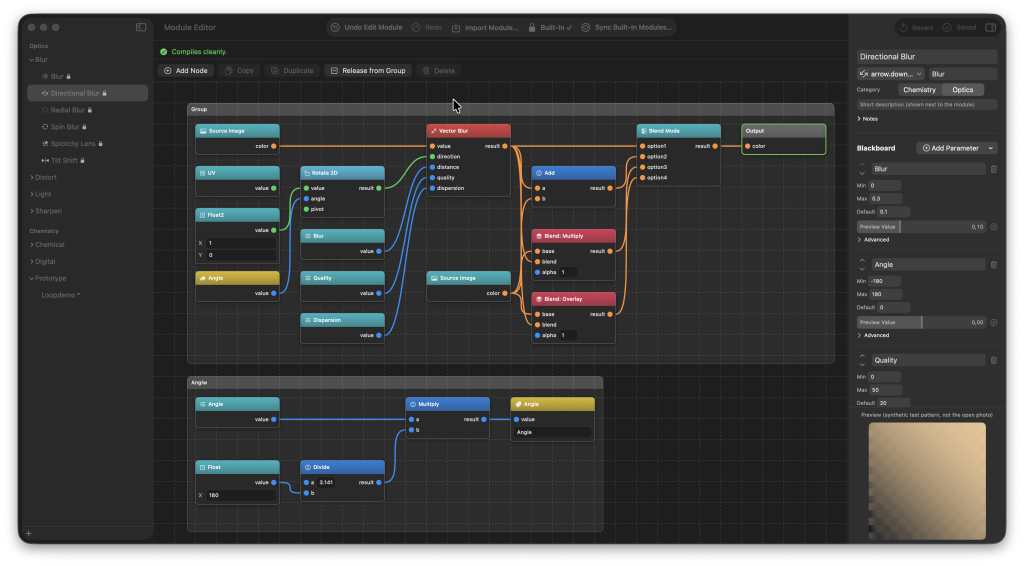
The approach follows the node-library documentation style used by tools like Unity’s Shader Graph: one row per node, its inputs and outputs, and what it actually computes. Where an input is left unconnected, it falls back to the default value shown in parentheses.
- Naming and organizing a module
- The blackboard
- Grouping nodes
- Loops
- Math (28)
- Vector (11)
- Comparison / Logic (9)
- Color (20)
- Noise (9)
- Masks / Gradients (5)
- Filters (5)
- Input (11)
- Utility (5)
Naming and organizing a module
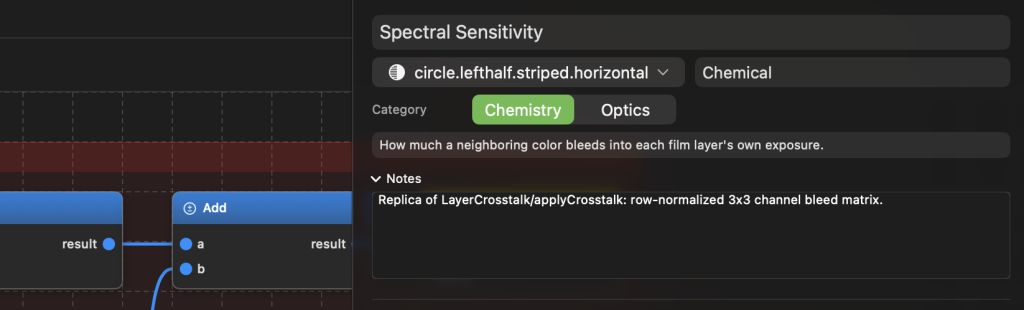
Every module carries five settings of its own, separate from anything on the canvas, edited at the top of the Module Editor whenever you have that module open. None of them affect what the graph computes, they only affect how the module presents itself once it exists.
| Field | What it does |
|---|---|
| Name | The module’s display name, shown everywhere it appears: the Add Module menu, the Browse grid, an applied stock’s stack list. |
| Group | Where the module sits in the Add Custom Module menu. Plain text, not a fixed list, comma-separated segments build nested submenus in the order written, for example “Vintage, Film Looks” nests under Vintage → Film Looks. Leave it empty and the module sits at the menu’s own root. |
| Icon | An SF Symbol shown next to the module in the sidebar list, the Add menu, and its own header once placed in a stack. Picked from a searchable popover, the same symbol catalog the system’s own icon picker uses. |
| Description | A short blurb shown alongside the module wherever it’s offered for picking, the equivalent of a one-line pitch for what it does. |
| Notes | A free-form scratchpad for your own reminders, only ever visible here in the Module Editor. It never appears anywhere a stock’s owner or a Marketplace visitor would see it. |
A module also declares which stack it belongs to, Chemistry or Optics, which decides which Add Module menu it shows up in. This is cosmetic organization too, the same graph engine runs either way.
The blackboard
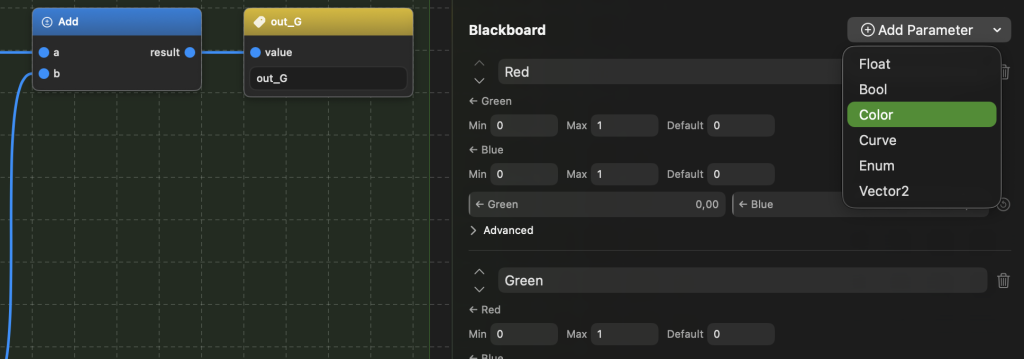
The blackboard is a module’s public API: whatever parameters you put on it become the live sliders, toggles, and pickers the stack panel shows once the module is applied. Everything else on the canvas is internal plumbing nobody outside the Module Editor ever sees. A node reads a blackboard value into the graph with a Blackboard Parameter node (for Float, Bool, Color, or Vector2), a Blackboard Curve node (for a Curve parameter), or a Blackboard Switch node (for an Enum parameter, exposing up to eight wireable option inputs, one per choice the enum actually has).
Parameter types
| Type | What it is |
|---|---|
| Float | A single number with a min, max, and default. Renders as a slider. |
| Bool | An on/off toggle with a default value. |
| Color | An RGB color picker. The picker also stores alpha so it round-trips exactly what you set, but only RGB ever reaches the graph, an alpha channel isn’t something the node system can read from it. |
| Vector2 | Two independent sliders, X then Y, each with its own min, max, default, label, and fill style, not a 2D drag pad. |
| Curve | A five-point tone-curve editor. Min and max bound the curve’s Y-range, the five X positions are fixed. Only reachable from the graph via a Blackboard Curve node. |
| Enum | A named list of two or more options. Renders as a segmented control for three or more choices, or a simple toggle for exactly two. Only reachable from the graph via a Blackboard Switch node. |
Advanced options
Every parameter, whatever its type, carries two options tucked under its own Advanced disclosure:
- Group Under Advanced, moves the control out of the panel’s main list into a secondary, collapsed Advanced section once the module is applied, for settings most people will never need to touch.
- Show When, ties this parameter’s visibility to another Enum parameter’s currently selected option. Pick the controlling Enum and which of its choices should reveal this one, everything else keeps it hidden. Useful for a mode switch that only exposes the options relevant to whichever mode is active.
Float parameters carry a few more of their own: a whole-numbers-only toggle for anything that should snap to integers, custom text for the labels shown at the slider’s two extremes, and a fill style for the slider track.
The order parameters sit in on the blackboard is purely cosmetic. Every reference to a parameter, from any node, is by a stable internal ID, never by name, so renaming or reordering a parameter never breaks a graph that reads it.
Grouping nodes
A group is a labeled box drawn around a cluster of nodes, purely for keeping a large graph readable. It never changes what the graph computes, it exists only on the canvas.
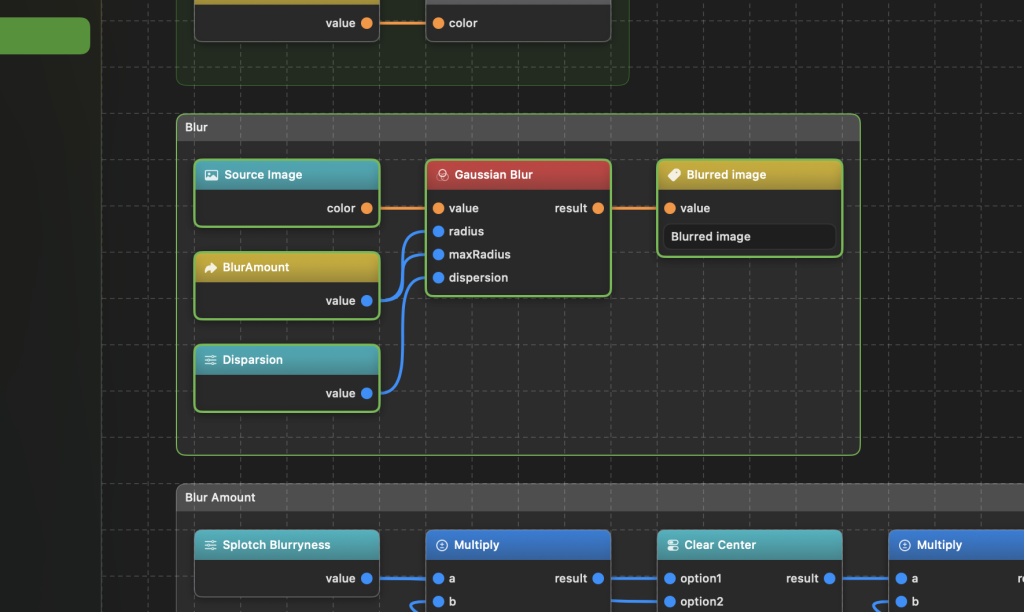
- Select two or more nodes, then use Group Nodes from the canvas toolbar or the right-click menu.
- Rename the group inline, in the text field on its own header strip.
- Recolor it from the header’s color popover, or leave it uncolored for a neutral gray box.
- Drag the header strip to move every member together as one unit. Dragging anywhere else inside the box falls through to ordinary marquee-select, so you can still select a subset of a group’s own members.
- Drop a node, or a whole selection, onto an existing group’s box to add it. A node belongs to at most one group at a time, and groups cannot nest inside other groups.
- Dissolve Group removes the box but leaves every node exactly where it was. Release from Group pulls only the currently-selected members out, without dissolving the rest of the group.
Loops
A loop repeats a computation over its own result a set number of times, the mechanism behind echo, feedback, and iterative-refinement effects. It is built from three of the four Redirector nodes: Redirect, Redirect Call, and Loop, plus the optional Loop Iteration node, and only becomes available in the Add Node palette once a Redirect exists to target.
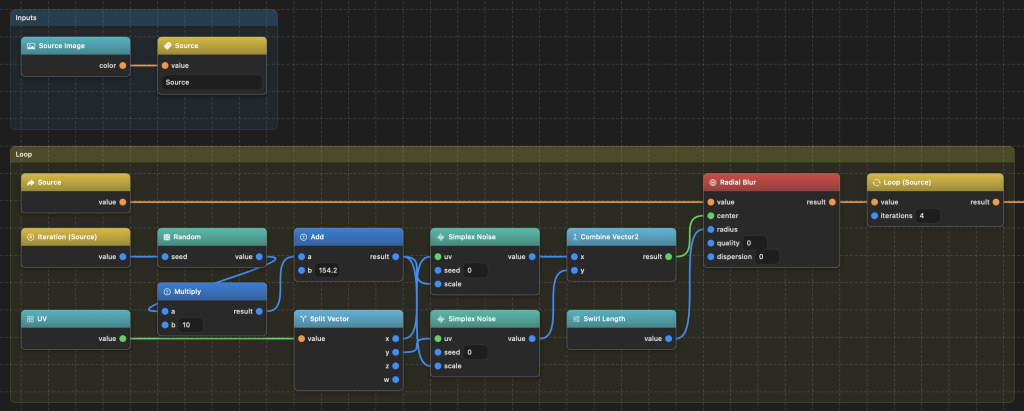
Building one
- Place a Redirect and wire in whatever should seed iteration zero, this becomes the loop’s running value.
- Somewhere downstream, read that value back with one or more Redirect Call nodes targeting the same Redirect, and build the one-iteration transform from there, whatever should happen to the value on each pass.
- Wire the result of that transform into a Loop node’s value input, and set Loop’s targeted redirect to the same Redirect from step one.
- Set Loop’s iterations input, a plain wireable number, default 4, to how many passes to run.
- Wire Loop’s own output wherever the final, post-every-iteration result belongs.
Drop in a Loop Iteration node anywhere inside that one-iteration transform, targeting the same Redirect, to read back the current pass number (0-based) while it runs, pairs naturally with a Random node for a different value on every tap.
What is actually happening
A Loop compiles to a real, bounded loop on the GPU that runs the one-iteration transform as its own extracted function, once per pass, it is not duplicated N times as unrolled source. A higher iteration count costs GPU time when the image renders, never shader size or compile time.
Iterations is clamped to 64 at render time, as a safety net rather than a real ceiling, it exists to catch a stray typo or a runaway blackboard slider before it turns one render into an unbounded-feeling stall, not to restrict deliberate use.
Loops can nest, a Loop can sit inside another Loop’s own one-iteration transform, each keeps its own independent running value and its own independent tap count, and an inner Loop Iteration node can still read either loop’s current pass correctly depending on which Redirect it targets.
Silver checks, before it will compile a module, that whatever you wired into Loop’s value input actually traces back to a Redirect Call reading that same Redirect. Wiring in something that never reads the running value back is flagged as an error rather than silently accepted, since it would just recompute the exact same result on every pass for no reason, almost always a forgotten Redirect Call rather than something intended.
Node catalog
Every node available in the Add Node palette, organized into the same categories the palette itself uses.
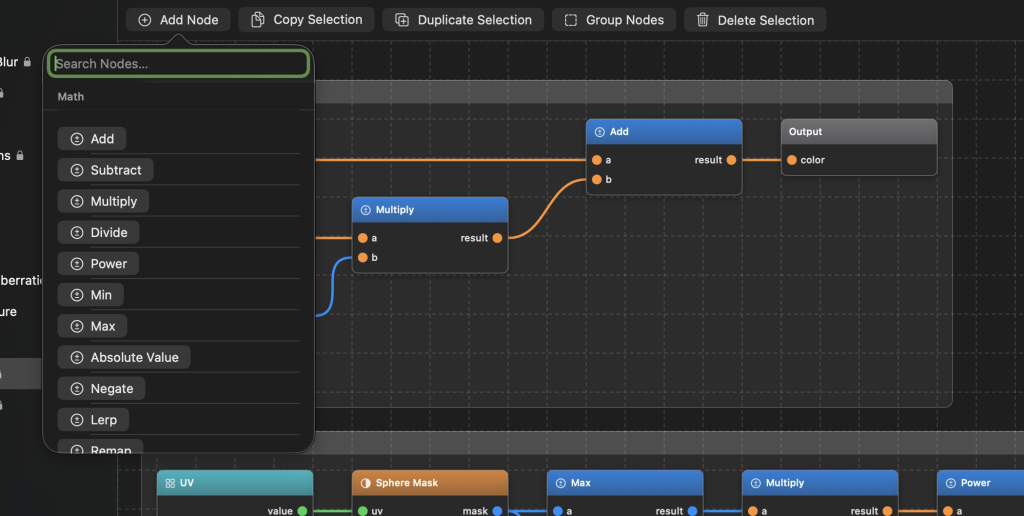
Math (28)
General-purpose scalar and vector arithmetic. The plain building blocks almost every graph leans on somewhere.
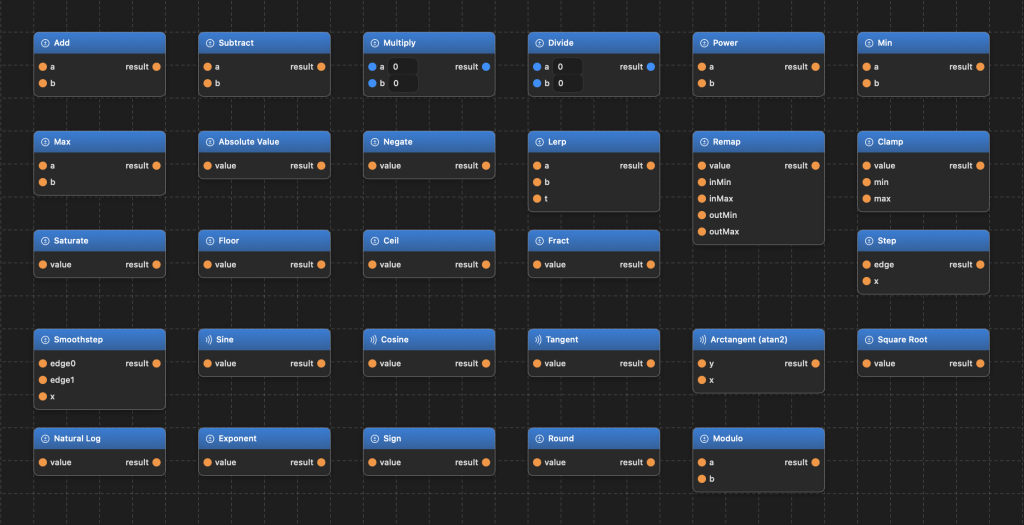
| Node | Inputs | Outputs | Description |
|---|---|---|---|
| Add (add) | a, b | result | Componentwise a + b. |
| Subtract (subtract) | a, b | result | Componentwise a - b. |
| Multiply (multiply) | a, b | result | Componentwise a * b. |
| Divide (divide) | a, b | result | Componentwise a / b (no divide-by-zero guard, garbage in, garbage out). |
| Power (power) | a, b | result | pow(a, b). |
| Min (min) | a, b | result | Componentwise min(a, b). |
| Max (max) | a, b | result | Componentwise max(a, b). |
| Absolute Value (absoluteValue) | value | result | abs(value). |
| Negate (negate) | value | result | -value. |
| Lerp (lerp) | a, b, t | result | Linear interpolation mix(a, b, t). |
| Remap (remap) | value, inMin(0), inMax(1), outMin(0), outMax(1) | result | Rescales value from [inMin,inMax] to [outMin,outMax], no zero-range guard. |
| Clamp (clamp) | value, min(0), max(1) | result | clamp(value, min, max). |
| Saturate (saturate) | value | result | Clamps to [0,1]. |
| Floor (floor) | value | result | floor(value). |
| Ceil (ceil) | value | result | ceil(value). |
| Fract (fract) | value | result | Fractional part, fract(value). |
| Step (step) | edge, x | result | step(edge, x), 0 below edge, 1 at/above. |
| Smoothstep (smoothstep) | edge0(0), edge1(1), x | result | Hermite-smoothed step between the two edges. |
| Sine (sine) | value | result | sin(value), radians. |
| Cosine (cosine) | value | result | cos(value), radians. |
| Tangent (tangent) | value | result | tan(value), radians. |
| Arctangent (atan2) (arcTangent2) | y, x | result | atan2(y, x), radians. |
| Square Root (squareRoot) | value | result | sqrt(value). |
| Natural Log (naturalLog) | value | result | log(value). |
| Exponent (exponent) | value | result | exp(value). |
| Sign (sign) | value | result | sign(value): -1/0/1. |
| Round (roundToNearest) | value | result | round(value). |
| Modulo (modulo) | a, b(1) | result | GLSL-style mod (a - b*floor(a/b), sign of b), the wrap/tiling behavior most authors expect, deliberately not MSL’s C-style fmod. |
Vector (11)
Operations specific to multi-component values: splitting and reassembling channels, distances, rotation, tiling UVs.
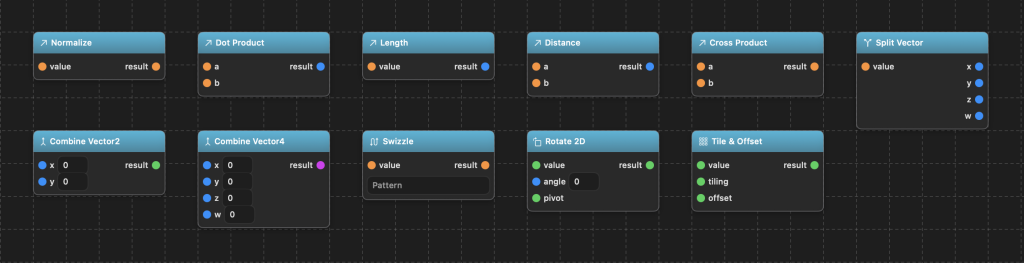
| Node | Inputs | Outputs | Description |
|---|---|---|---|
| Normalize (normalize) | value | result | normalize(value). |
| Dot Product (dotProduct) | a, b | result (float) | dot(a, b). |
| Length (length) | value | result (float) | length(value). |
| Distance (distance) | a, b | result (float) | distance(a, b). |
| Cross Product (crossProduct) | a (float3), b (float3) | result (float3) | cross(a, b), fixed float3 only. |
| Split Vector (splitVector) | value | x, y, z, w (all float) | Breaks any vector into its up-to-4 scalar components; components beyond the resolved width read literal 0.0. |
| Combine Vector2 (combineVector2) | x, y | result (float2) | float2(x, y). |
| Combine Vector4 (combineVector4) | x, y, z, w | result (float4) | float4(x, y, z, w). |
| Swizzle (swizzle) | value | result | Reorders/repeats components per a pattern string (for example “zyx” reverses a float3, “xxx” splats); output width equals the pattern length. |
| Rotate 2D (rotate2D) | value (float2), angle(0), pivot (float2, 0,0) | result (float2) | Rotates a float2 (typically a UV) by angle radians around pivot. |
| Tile and Offset (tileAndOffset) | value (float2), tiling(1,1), offset(0,0) | result (float2) | value * tiling + offset, the single most common UV-prep operation, folded into one node. |
Comparison / Logic (9)
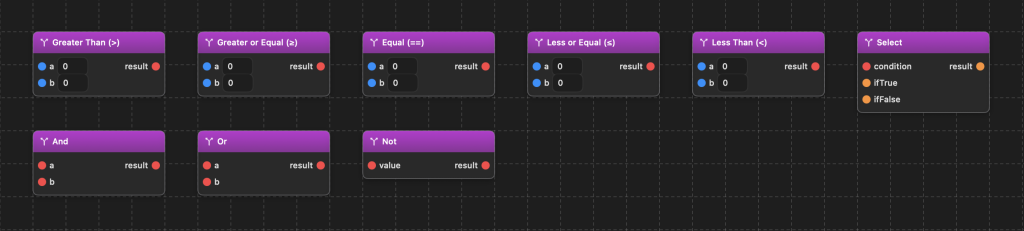
Branching and boolean logic. Drive a Select node, a mask, or a blackboard switch from a condition instead of a fixed value.
| Node | Inputs | Outputs | Description |
|---|---|---|---|
| Greater Than (>) (compareGreaterThan) | a (float), b (float) | result (bool) | a > b. |
| Greater or Equal (>=) (compareGreaterOrEqual) | a, b | result (bool) | a >= b. |
| Equal (==) (compareEqual) | a, b | result (bool) | a == b. |
| Less or Equal (<=) (compareLessOrEqual) | a, b | result (bool) | a <= b. |
| Less Than (<) (compareLessThan) | a, b | result (bool) | a < b. |
| Select (select) | condition (bool), ifTrue, ifFalse | result | C-style ternary condition ? ifTrue : ifFalse. |
| And (and) | a (bool), b (bool) | result (bool) | a && b. |
| Or (or) | a (bool), b (bool) | result (bool) | a || b. |
| Not (not) | value (bool) | result (bool) | !value. |
Color (20)
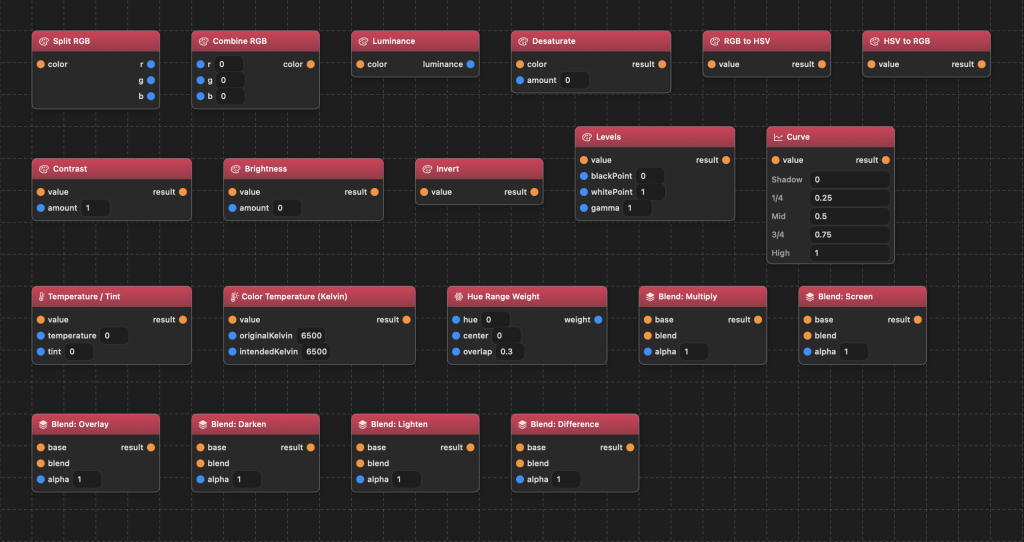
The color-grading vocabulary: channel splitting, HSV conversion, tone curves, white balance, and Photoshop-style blend modes.
| Node | Inputs | Outputs | Description |
|---|---|---|---|
| Split RGB (splitRGB) | color (float3) | r, g, b (float) | Splits a float3 color into its R/G/B scalar channels. |
| Combine RGB (combineRGB) | r, g, b (float) | color (float3) | float3(r, g, b). |
| Luminance (luminance) | color (float3) | luminance (float) | Rec. 709 luma: dot(color, float3(0.2126, 0.7152, 0.0722)). |
| Desaturate (desaturate) | color (float3), amount (float) | result (float3) | Lerps between color and its own luminance by amount. |
| RGB to HSV (rgbToHSV) | value (float3) | result (float3) | Converts RGB to HSV. |
| HSV to RGB (hsvToRGB) | value (float3) | result (float3) | Converts HSV to RGB. |
| Contrast (contrast) | value, amount(1) | result | (value - 0.5) * amount + 0.5. |
| Brightness (brightness) | value, amount(0) | result | value + amount. |
| Invert (invert) | value | result | 1.0 - value. |
| Levels (levels) | value, blackPoint(0), whitePoint(1), gamma(1) | result | Photoshop-style Levels: normalizes [blackPoint, whitePoint] to [0,1], then applies gamma as a midpoint power curve. |
| Curve (curve) | value | result | Evaluates a per-component tone curve (5-point Hermite spline, GIMP-curves-compatible) against value. |
| Temperature / Tint (temperatureTint) | value, temperature(0), tint(0) | result | Shifts red vs blue by temperature and green vs magenta by tint; a simple, non-physical approximation. |
| Color Temperature (Kelvin) (colorTemperatureKelvin) | value, originalKelvin(6500), intendedKelvin(6500) | result | Physically-grounded white balance: converts both Kelvin values to blackbody RGB and multiplies value by the ratio intended/original. |
| Hue Range Weight (hueRangeWeight) | hue(0), center(0), overlap(0.3) | weight (float) | Returns 0 to 1: how strongly a wrapping hue belongs to a 60-degree-wide sector centered at center, smoothly falling off over overlap. |
| Blend: Multiply (blendMultiply) | base, blend, alpha(1) | result | mix(base, base*blend, alpha). |
| Blend: Screen (blendScreen) | base, blend, alpha(1) | result | mix(base, 1-(1-base)*(1-blend), alpha). |
| Blend: Overlay (blendOverlay) | base, blend, alpha(1) | result | Standard Photoshop Overlay, then blended by alpha. |
| Blend: Darken (blendDarken) | base, blend, alpha(1) | result | mix(base, min(base,blend), alpha). |
| Blend: Lighten (blendLighten) | base, blend, alpha(1) | result | mix(base, max(base,blend), alpha). |
| Blend: Difference (blendDifference) | base, blend, alpha(1) | result | mix(base, abs(base-blend), alpha). |
Noise (9)
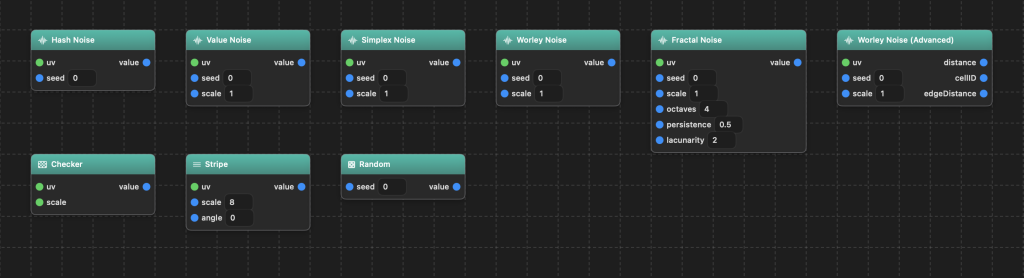
Procedural texture generators, for grain, film artifacts, and any organic variation that should not look hand-drawn.
| Node | Inputs | Outputs | Description |
|---|---|---|---|
| Hash Noise (hashNoise) | uv(float2), seed(float) | value (float) | Plain per-pixel white-noise hash, no spatial coherence. |
| Value Noise (valueNoise2D) | uv, seed, scale(1) | value | Classic bilinear-interpolated value noise. |
| Simplex Noise (simplexNoise2D) | uv, seed, scale(1) | value | 2D simplex noise. |
| Worley Noise (worleyNoise2D) | uv, seed, scale(1) | value | Cellular/Voronoi noise: distance to the nearest of a jittered grid of feature points. |
| Fractal Noise (fractalNoise2D) | uv, seed, scale(1), octaves(4), persistence(0.5), lacunarity(2) | value | Fractional Brownian motion: layers simplex noise at successively higher frequency and lower amplitude, up to 8 octaves. |
| Worley Noise (Advanced) (worleyNoise2DAdvanced) | uv, seed, scale(1) | distance, cellID, edgeDistance | Richer Worley: also exposes a stable per-cell cellID and edgeDistance (near-zero at cell borders, for cracks). |
| Checker (checker) | uv(0.5,0.5), scale(4,4) | value | Two-tone checkerboard pattern. |
| Stripe (stripe) | uv(0.5,0.5), scale(8), angle(0) | value | Repeating, feathered bands along an arbitrary angle direction. |
| Random (random) | seed(float) | value (float) | A plain reproducible pseudo-random hash, pairs with Loop Iteration for a different value per loop tap. |
Masks / Gradients (5)
Soft-edged shapes and gradients for masking off a region of the image, circular, rectangular, elliptical, or directional.

| Node | Inputs | Outputs | Description |
|---|---|---|---|
| Sphere Mask (sphereMask) | uv(0.5,0.5), origin(0.5,0.5), radius(0.3), smoothness(0.1) | mask (float) | Soft circular mask. |
| Rectangle Mask (rectangleMask) | uv(0.5,0.5), origin(0.5,0.5), size(0.4,0.4), smoothness(0.05), cornerRadius(0) | mask | Soft rounded-rectangle mask; cornerRadius 0 gives sharp corners. |
| Ellipse Mask (ellipseMask) | uv(0.5,0.5), origin(0.5,0.5), radius(0.3,0.2), smoothness(0.1) | mask | Same idea as Sphere Mask with independent X/Y radii. |
| Linear Gradient (linearGradient) | uv(0.5,0.5), pointA(0,0.5), pointB(1,0.5) | value (float) | Projects uv onto the pointA-to-pointB axis, normalized 0 to 1 along that axis. |
| Radial Gradient (radialGradient) | uv(0.5,0.5), origin(0.5,0.5), radius(0.5) | value (float) | Bright at center, fading out to radius. |
Filters (5)
The blur family and image re-sampling. These read back from an image rather than just combining numbers.

| Node | Inputs | Outputs | Description |
|---|---|---|---|
| Gaussian Blur (blur) | value, radius(0.02), maxRadius(0.1), dispersion(0) | result | Gaussian blur of whatever is wired into value. Uses a real GPU blur pyramid when radius is constant; falls back to a scatter-sample approximation when radius varies per pixel. dispersion splits R/G/B into separately-scaled radii for a chromatic-aberration look. |
| Variable Blur (variableBlur) | value, radius(0.02), quality(12), dispersion(0) | result | Same scatter-sample mechanism as Blur’s fallback, but always taken, for genuinely per-pixel-varying radius (tilt-shift, scattered blur pockets, vignette falloff). |
| Radial Blur (radialBlur) | value, center(0.5,0.5), radius(0.15), quality(12), dispersion(0) | result | Directional zoom/streak blur: averages value sampled at points progressively closer to (or past) center. |
| Vector Blur (vectorBlur) | value, direction(1,0), distance(0.05), quality(12), dispersion(0) | result | Directional motion blur along an arbitrary per-pixel direction vector, spread symmetrically, the correct way to build a spin/rotational blur. |
| Sample At UV (sampleAtUV) | uv(0.5,0.5) | color (float3) | Re-samples the actual source image at an arbitrary UV, the general primitive behind lens distortion, chromatic aberration, or scratch-displacement effects. |
Input (11)
Where values enter a graph: the blackboard, fixed constants, and the image and UV coordinate being rendered.

| Node | Inputs | Outputs | Description |
|---|---|---|---|
| Blackboard Parameter (blackboardParameter) | (none) | per-instance type | Exposes one author-defined blackboard parameter’s live value as a graph output. |
| Color (colorConstant) | (none) | color (float3) | A fixed RGB color constant, set via a color picker on the card. |
| Float (floatConstant) | (none) | value (float) | A fixed scalar typed directly on the card. |
| Float2 (float2Constant) | (none) | value (float2) | Fixed float2 constant. |
| Float3 (float3Constant) | (none) | value (float3) | Fixed float3 constant. |
| Float4 (float4Constant) | (none) | value (float4) | Fixed float4 constant. |
| Blackboard Curve (blackboardCurve) | value | result | Curve’s counterpart whose curve shape comes from a blackboard parameter instead of a fixed per-node curve, so the module’s whole curve control lives in and is edited via the blackboard. |
| Blackboard Switch (blackboardSwitch) | option1 through option8 | result | Runtime multi-way switch: whichever option a referenced enum parameter is currently set to passes through to result. |
| Image Size (imageSize) | (none) | width, height (float) | The physical size of the image being rendered, in millimeters. |
| Source Image (sourceImage) | (none) | color (float3) | The photo being edited, sampled at the kernel’s current pixel. |
| UV (uv) | (none) | value (float2) | The kernel’s current per-pixel normalized UV coordinate. |
Utility (5)
Wiring and control-flow helpers: reroute, named redirects, and loops for repeating a computation over itself.

| Node | Inputs | Outputs | Description |
|---|---|---|---|
| Reroute (reroute) | in | out | A wire-routing convenience node, one input, one output, always equal, lets a link visibly bend or branch with zero computation. |
| Redirect (redirect) | value | (none) | Declares a named local variable: whatever is wired in becomes readable elsewhere in the graph via a matching Redirect Call, without a long wire snaking across the canvas. |
| Redirect Call (redirectCall) | (none) | per-instance type | Reads back whatever is wired into a specific named Redirect node’s input. |
| Loop (loop) | value, iterations(4) | result | Repeats a computation over itself a fixed number of times (echo/feedback effect), up to 64 iterations. |
| Loop Iteration (loopIteration) | (none) | value (float) | The current 0-based tap number of whichever Loop is re-evaluating the subgraph this node sits in, pairs naturally with Random. |
Back to How To Use.